Liturgies
Prayer documents and ritual texts, freely available for personal and devotional use.
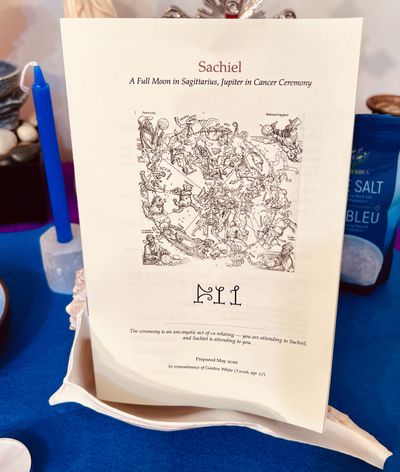
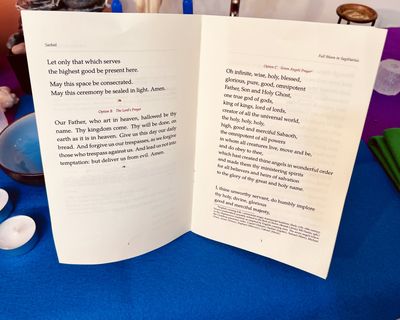
Sachiel: A Full Moon in Sagittarius Ceremony
Gordon's original call to ceremony from 2025:
Rune Soup: Full Moon In Sagittarius Ritual: Bring Me That Horizon
A ceremonial booklet for the Full Moon in Sagittarius on May 31, 2026 — a rare alignment in which the Sun conjuncts Aldebaran and the Moon conjuncts Antares, placing the lunation directly on the ancient royal star axis. The ceremony works with Sachiel, the angelic intelligence of Jupiter, during his transit through Cancer: a current of expansion rooted in belonging, abundance rooted in nourishment and home. The rite draws on a single continuous tradition — Orphic hymn, Christian cunning folk prayer, Neoplatonic invocation, and New Thought affirmation — understood not as syncretism but as one lineage viewed from several windows. The booklet includes background on Sachiel's lineage and the theology of planetary angels (drawing on Aquinas, Pseudo-Dionysius, and Sheldrake and Fox's The Physics of Angels), four opening prayer options, hymns to the Moon and to Sachiel, a Florence Scovel Shinn affirmation, and guidance for ongoing practice. Prepared in memory of Gordon White (†2026), whose video on Jupiter in Cancer was the source and occasion for this work. Thanks also to RSPM Mike (Technomancing the Stone) for re-posting the video.
Compline & Examen — A Personal Evening Office
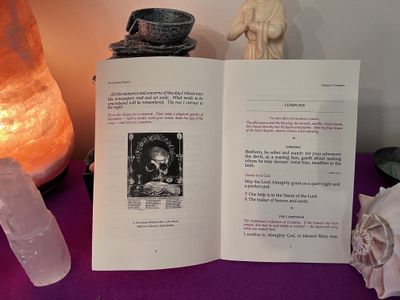
A printable booklet containing two offices for evening use: the Ignatian Examen (a structured review and release of the day) and Compline (the Benedictine night office). The two are intended in sequence — the Examen prepares the ground, Compline completes the day. Includes the psalms of Compline (Psalms 4, 31:1–5, 91, 134) in the Coverdale translation, the Te Lucis hymn, the Nunc Dimittis, the Responsory, the Salve Regina, and the Angelus. The Examen follows the Ignatian five-point structure as adapted by Gordon White in the RSPM Prayer Course. Available in an English-only edition and a bilingual Latin/English edition.
Printing a booklet
The booklet PDFs above were generated with pdfbook2, a command-line tool that performs
imposition — rearranging the pages of a PDF so that when printed double-sided and folded along the
spine, they form a saddle-stitched booklet. Two variants are provided for each text: one for
short-edge duplex printing and one for long-edge, because printers differ
in how they flip the sheet when printing the second side.
Installing pdfbook2
pdfbook2 ships as part of TeX Live, the standard LaTeX distribution. Source and full
documentation are at github.com/jenom/pdfbook2.
macOS — install MacTeX (full TeX Live) from
tug.org/mactex, or the smaller BasicTeX
if you already manage TeX packages manually. After installation, open a new Terminal window and
pdfbook2 will be on your path.
Short edge vs. long edge
When a printer prints double-sided, after printing the first side it feeds the sheet back in to print the second side. How it flips that sheet is your duplex binding:
- Long-edge binding — the sheet flips along the long (left / right) side, like turning the page of a book. This is the default on most desktop laser printers.
- Short-edge binding — the sheet flips along the short (top / bottom) side, like flipping a notepad. Many inkjet printers use this, as do some laser printers operating in landscape orientation.
Choosing the wrong variant will cause the back of every sheet to print upside-down. If you are unsure which your printer uses, print any two-page document using each duplex setting and check which comes out correctly oriented on both sides when you flip it over.
Generating booklets yourself
If you want to process the source PDF yourself rather than using the pre-generated booklet files:
# Long-edge binding (the default)
pdfbook2 --no-crop document.pdf

# Short-edge binding
pdfbook2 --no-crop --short-edge document.pdf

# Specify paper size (default is A4 — change to letter if needed)
pdfbook2 --no-crop --paper=letter --short-edge document.pdf
The output is written to the same directory as the input, named document-book.pdf. Run
pdfbook2 --help to see all available options.
--no-crop
By default, pdfbook2 crops the source pages before imposition — trimming the margins to
maximise the printable area on each half-sheet. For a document whose margins were set deliberately (a
LaTeX booklet, a liturgical text with intentional whitespace), this re-margining will override your
design and can make the result look cramped or off-balance.
The --no-crop flag disables this behaviour, placing each source page onto the imposed
sheet exactly as it was laid out, margins intact. The booklets on this page were all generated with
--no-crop.
You may want to omit --no-crop if your source PDF has very large margins that would
waste too much of the half-sheet, or if you are working with a document that was not designed with
booklet printing in mind.
Printing the booklet
- Open the booklet PDF in your viewer (Preview, Evince, Adobe Reader, etc.).
- Open the Print dialog — ⌘P on macOS, Ctrl+P on Linux/Windows.
- Enable Two-Sided (Duplex) printing.
- Set the binding edge to match the variant you downloaded: Short-Edge Binding or Long-Edge Binding.
- Print at 100% scale — do not scale to fit; the imposition margins are already baked in.
- Collect the sheets in order, fold in half along the spine, and press flat with a bone folder if you have one.
- Saddle-stitch with a long-arm stapler, or sew through the fold with a needle and thread for a more durable pamphlet binding.
Some printers include a built-in Booklet print mode in their driver. If yours does, you may be able to skip the imposition step entirely — print the regular (non-booklet) PDF and let the driver handle the page rearrangement for you.